It is 5:40 and a dad is at the door with his coat still on. “Did she nap?” The teacher who ran the nap room went home at three, the sheet on the clipboard says “good day!”, and nobody is quite sure whether lunch was mostly eaten or mostly thrown. He smiles and says it’s fine. It isn’t, quite.
A good daycare daily report prevents that moment. It tells parents what they actually want to know, in the same order every day, and it gets written as the day happens rather than from memory at closing time. Here is what to include, how to handle incidents, and how to keep each entry down to a few seconds.
What should a daycare daily report include?
Parents read a daily report for two reasons: to know their child was cared for, and to plan the evening. Will she be starving at six? Is he going to be up until ten after a short nap? Write for those questions.
A complete report covers seven things.
- Arrival and pickup. Time in, who dropped off, and anything the parent mentioned (slept badly, new tooth, grandma collecting today). Time out and who picked up.
- Meals and bottles. What was offered and how much was eaten. “All, most, some, none” is faster and clearer than a sentence. For bottles, the amount and the time.
- Naps. Start and end times. If a child lay down but didn’t sleep, say so. “Rested 45 minutes, didn’t sleep” is useful information.
- Diapers and toileting. Times, wet or BM, potty attempts and successes. Note anything unusual, like a rash or a cream you applied with the parent’s permission.
- Activities. One or two specific lines. “Painted with sponges and told everyone it was a dinosaur” beats “had a great day.”
- Mood. A word or two, ideally tied to a time. “Cranky before lunch, happy after” helps a parent more than “fussy.”
- Supplies needed. Diapers, wipes, spare clothes, formula. Parents can’t bring what nobody asked for.
For infants, meals, naps and diapers carry most of the weight, and times matter. For preschoolers, activities and mood matter more, and diaper notes become toileting notes or disappear.
Handle incidents on a separate form
Bumps, bites, falls and anything that needed first aid don’t belong in a one-line note between lunch and nap. Write them up on their own form, every time, even when the injury is tiny.
A useful incident record answers six questions:
- What happened, in plain words, without blame?
- When and where, to the minute if you can?
- Who saw it, and which staff member was responsible?
- What first aid was given, and by whom?
- How and when was the parent told?
- Have both the staff member and the parent signed it?
The daily report then gets one line: “Bumped forehead on the climber at 10:15, see incident form.” The parent knows there is more to read, and the full record stays on file.
What an incident form must contain, when a parent must be called rather than told at pickup, and how long you keep the records all depend on your licensing rules. Check with your state licensing agency or local regulator, because these vary from place to place. For the wider question of which business records to hold onto and how to file them, see this guide to small business record keeping.
How to keep daily reports quick
The slow way to write daily reports is at 4:45, from memory, for every child at once. The fast way is to log each thing when it happens.
Here is the difference in numbers. Say you have 10 toddlers and each needs about eight entries a day: arrival, breakfast, lunch, snack, a nap and three diaper checks. That’s 80 small entries. Logged as you go, each one takes ten seconds or so, which is roughly 13 minutes spread across the whole day. Left until the end, the same 80 entries become a stressful half hour of guessing, with the toddlers still in the room.
A few habits make logging as you go realistic:
- Keep the log where the work happens. A sheet or tablet by the changing table and another by the lunch tables, not one in the office.
- Use the same short codes everywhere. All, most, some, none for food. W and BM for diapers. Everyone writes them the same way.
- Prefill what’s the same for everyone. Today’s menu and today’s main activity can be written once, not once per child.
- Hand over at shift changes. The person leaving tells the person arriving who is due a diaper check and who hasn’t slept yet.
- Save the personal sentence for last. One specific line per child about something they did. It takes a minute or two per room before pickup, and it’s the part parents remember.
If you log on a tablet, a daycare management app with daily logs and a meals record keeps mood, naps and activities for each child, with a note for parents at pickup, so the personal sentence has somewhere to live. A clipboard works too, if everyone uses it.
Paper sheets, a spreadsheet or an app?
Every option can hold a good daily report, with real trade-offs.
Paper sheets are cheap, fast and work with wet hands. They’re also easy to lose, hard to read in someone else’s handwriting, and no help when a parent asks what their son ate last Tuesday.
A spreadsheet costs nothing and you can lay it out exactly how you want. But it lives on the office computer, not at the changing table, so somebody ends up typing up paper notes after closing.
A subscription childcare app usually sends reports and photos to parents’ phones during the day, which many families like. You pay for that every month, often per child or per classroom. At, say, $60 a month, that’s $720 a year, every year. Children’s details also sit on someone else’s servers, and the app needs internet to work.
An offline childcare system costs a one-time price, works without internet, and keeps records on your own device. The trade-offs are real: it doesn’t message parents’ phones, each device keeps its own records so you pick one for attendance, and you’re the one making backups. A simple weekly routine for backing up your records covers that last part in about ten minutes a week.
Keeping it all in one place
You can build all of this yourself. You’d need a daily sheet per child with times for meals, naps and diapers; a check-in list with who dropped off and who picked up; an incident form with a sign-off line; an allergy list someone can see at lunch; and a way to look back at last week without digging through boxes.
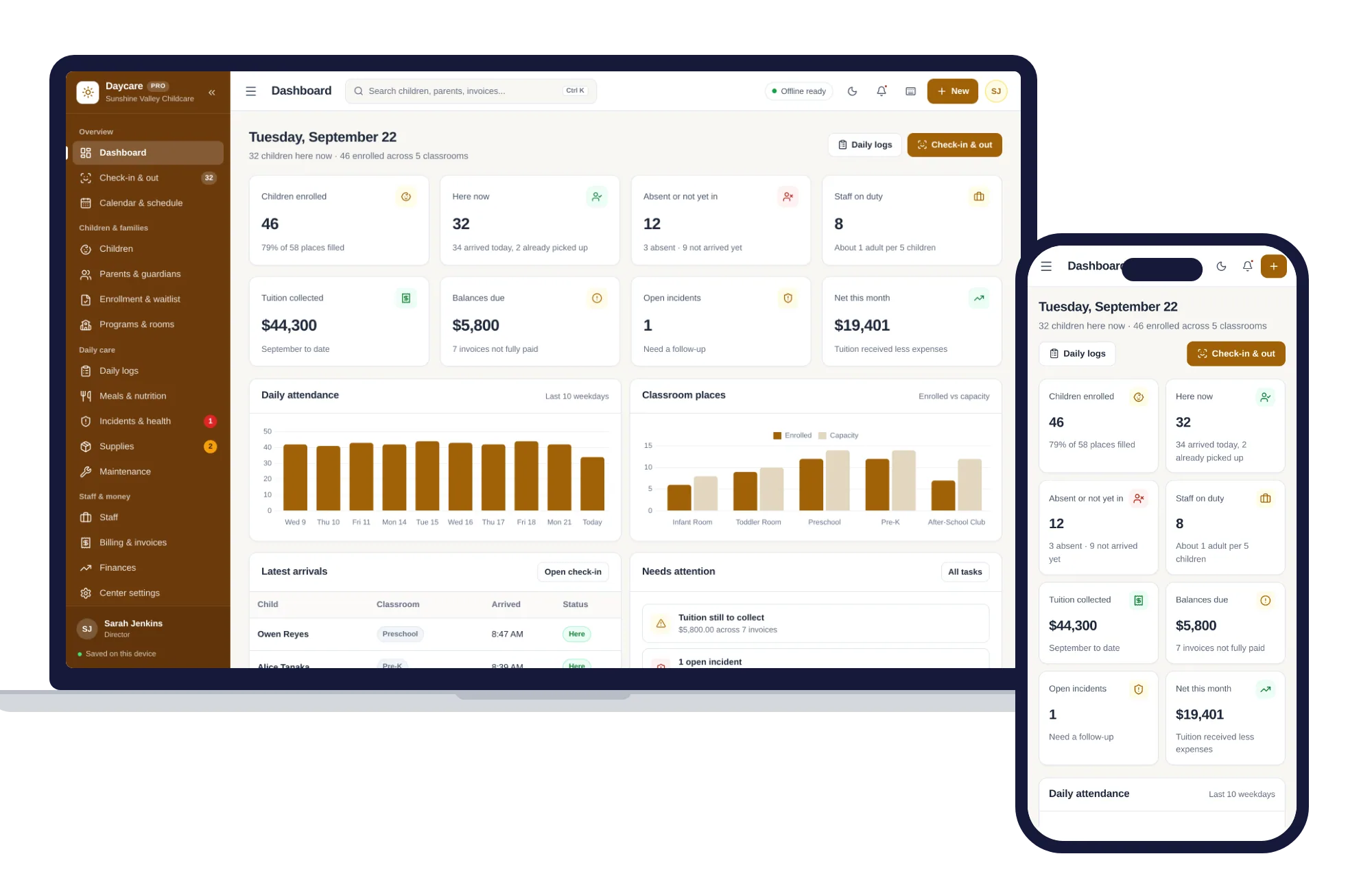
Daycare & Childcare Management already has those pieces, matched to the steps above:
- Check-in & out records arrivals and pickups in one tap, with who picked each child up and who is absent or not in yet.
- Daily logs hold mood, naps and activities, plus a note for parents at pickup, and you can look back at any date.
- Meals records what each child ate.
- Incidents covers first aid and sign-off.
- Children puts allergies and health notes up front on each profile, beside classroom, program and guardians.
- Families keeps phone numbers, billing and emergency contacts, and the balance each family owes, while Billing handles monthly tuition invoices you can print as PDFs.
One honest gap: there is no separate diaper chart among its screens. If your infant room changes a lot of diapers, keep a simple paper sheet on the changing table and let the pickup note carry the summary.
The layout adapts to tablets, so staff can keep check-in open at the front desk. It opens with sample data, so you can walk through a full day before typing in a single real child. There’s no account and no monthly fee, it runs without internet, and children’s records stay on your device. A four-digit PIN can lock the screen so a parent at the desk can’t read another family’s details.
For more tools built for schools, childcare and learning, browse the schools and learning shelf. Or see everything inside Daycare & Childcare Management and try tomorrow’s reports with the sample data first.
Skip the setup
The Daycare & Childcare Manager has the records this guide describes already set up. Check-in and out, children and families, daily logs, meals, staff and tuition billing — one offline app.
$29.99 one-time
- Sample data to try it the same day
- Works offline, records stay on your device
- A PDF guide in the download
See everything inside the Daycare & Childcare Manager. Or take the whole Schools & learning shelf: 8 systems for $119.99, $99 less than one by one.
Common questions
What should be included in a daycare daily report for infants?
For infants, focus on times and amounts. Note each bottle with the time and how much was taken, any solid food and how much was eaten, every nap with start and end times, each diaper change marked wet or BM, and anything unusual such as a rash. Add a short line about mood and a list of supplies running low, like diapers, wipes or formula.
Are daycares required to give parents daily reports?
It depends on where you operate. Some licensing rules expect written daily records for infants and toddlers, while others leave the format up to the provider. Your state licensing agency or local regulator is the place to confirm what applies to you. Even where nothing is required, most parents expect a short daily summary, and a consistent one builds trust quickly.
How do you write a daycare incident report?
Describe what happened in plain, factual words without blame, with the exact time and place. Record who saw it, which staff member was responsible, what first aid was given and by whom, and how and when the parent was told. Have the staff member and the parent sign it, keep it on file, and check your licensing rules for anything else they require.
Is it better to do daycare daily reports on paper or in an app?
Paper is cheap and quick at the changing table but easy to lose and hard to search later. Subscription apps send updates to parents during the day but charge every month and need internet. An offline app keeps records on one device for a one-time price but does not message parents. Pick the option your staff will actually fill in as the day happens.