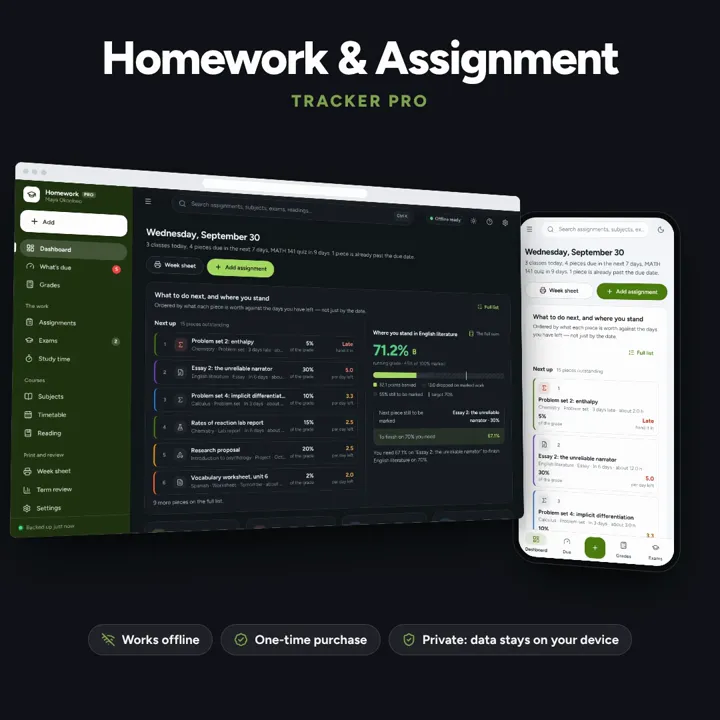
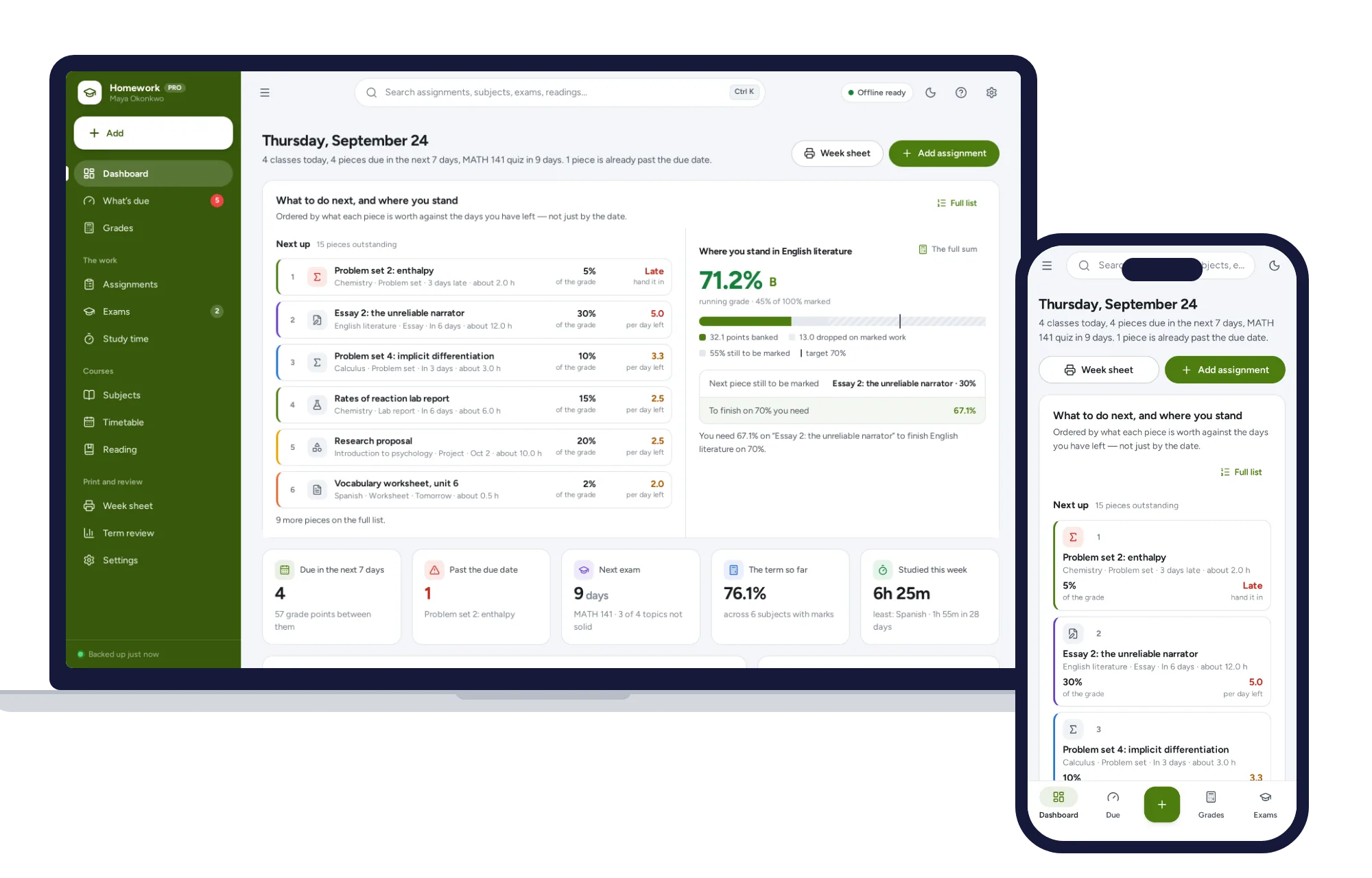
Start with the thing that matters, not the thing due first
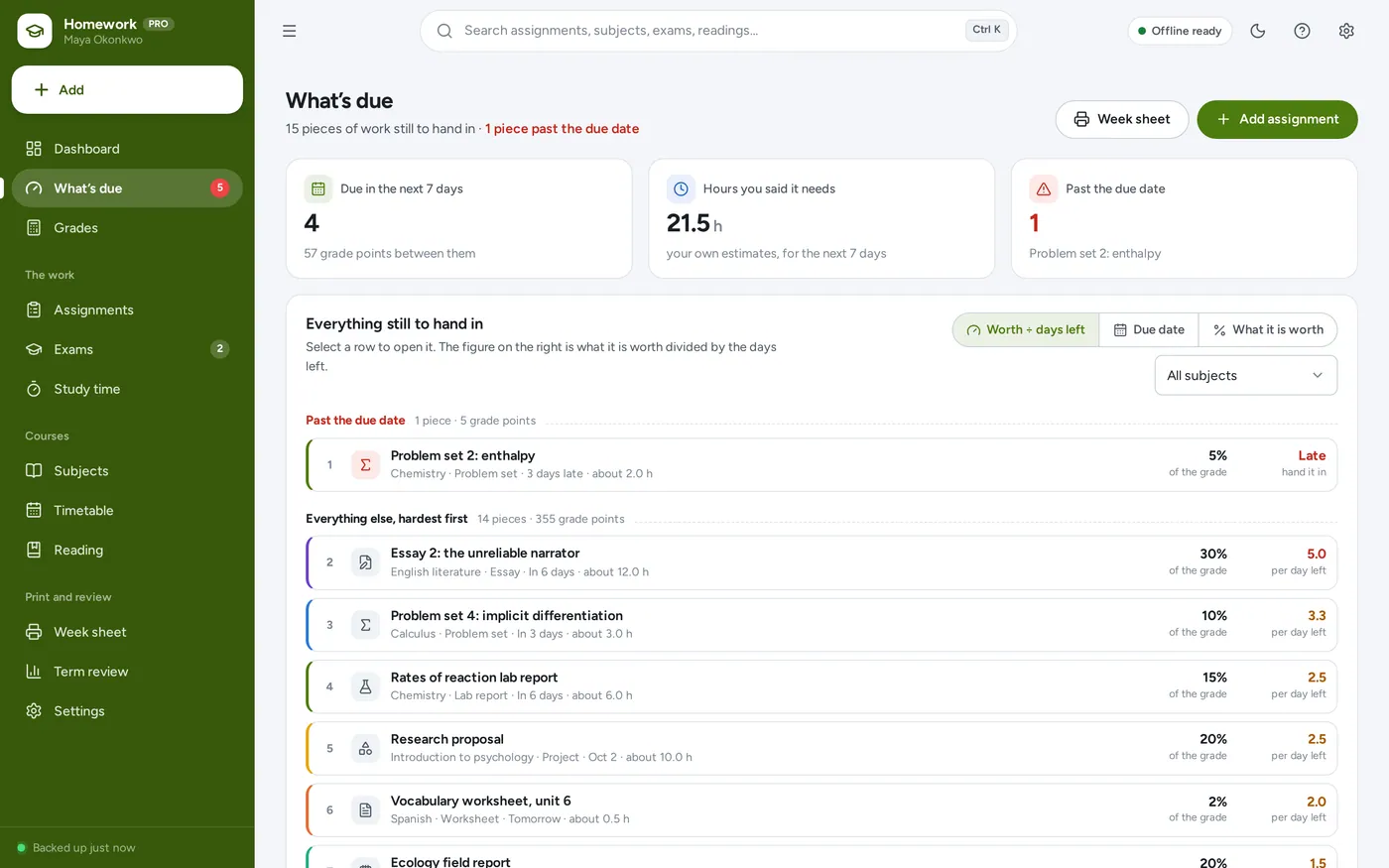
Ordered by what each piece is worth divided by the days left
A 30% essay in six days outranks a 2% worksheet due tomorrow
Anything past its due date leads the list, whatever it is worth
Grades
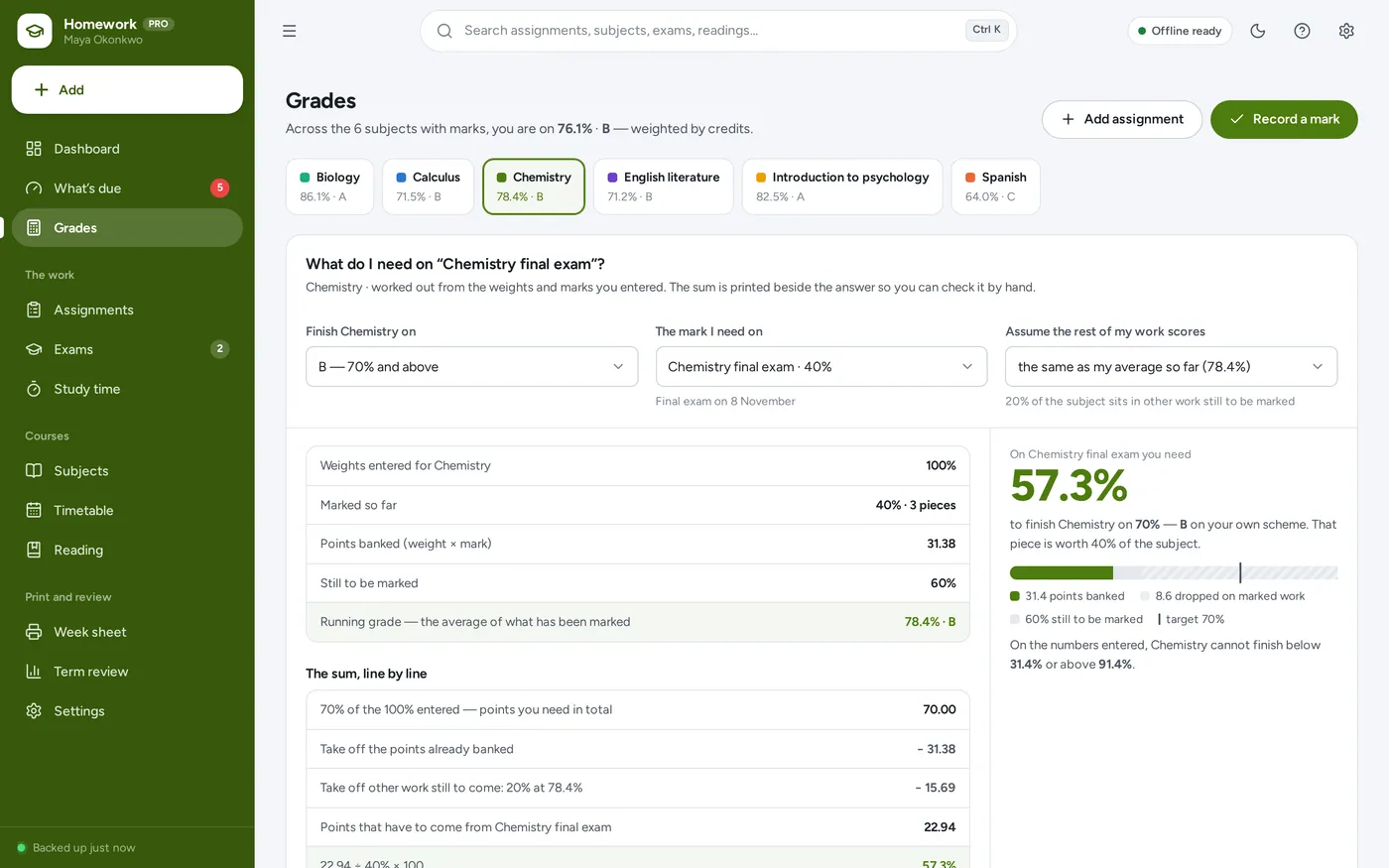
Know the mark you need on the final
Pick the grade you want and the piece still to be marked
The whole sum is printed beside the answer, line by line
Arithmetic on the numbers you enter — never a prediction
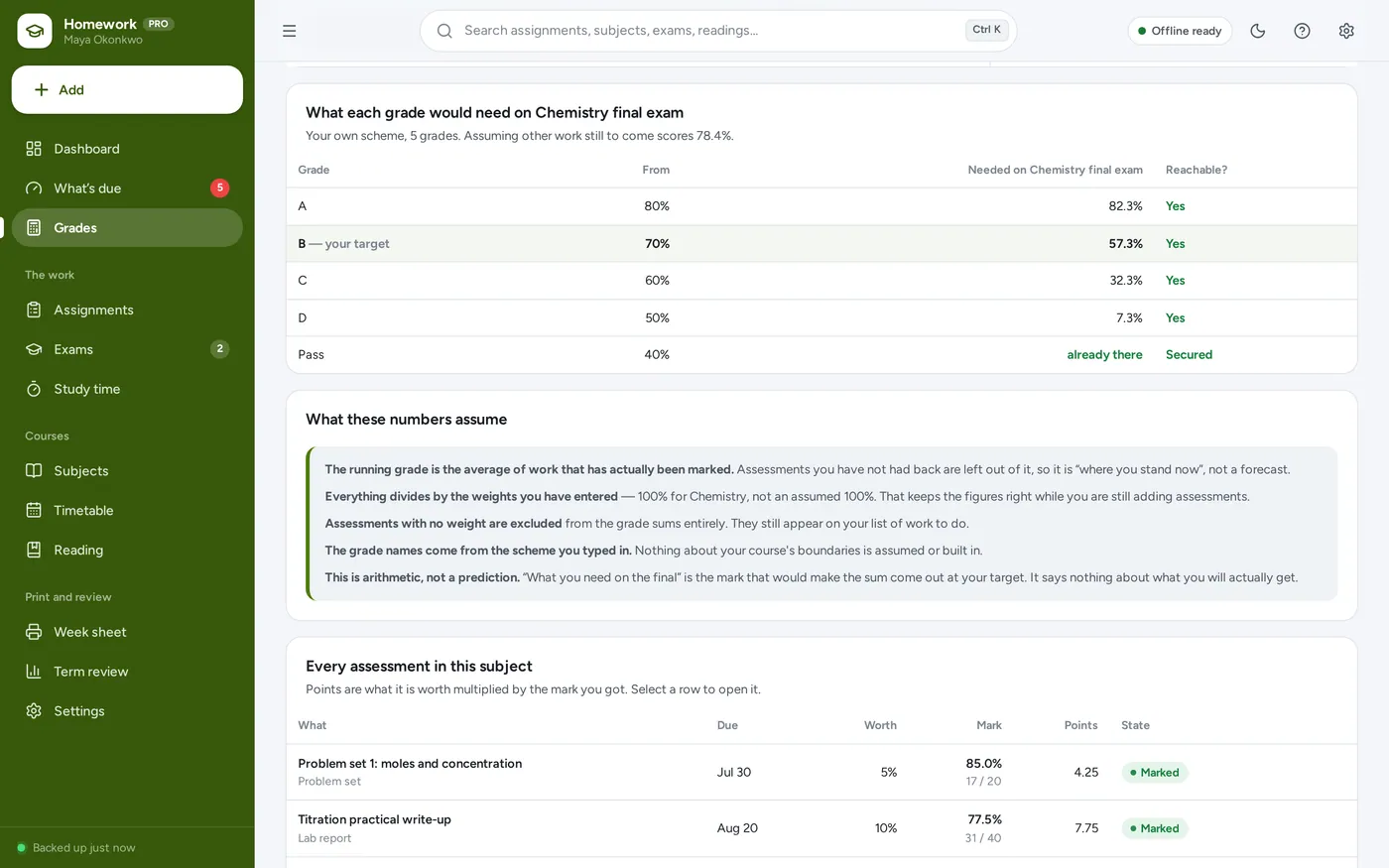
Your own scheme
Your grade boundaries, not a guess at them
Type in the scheme your handbook uses — nothing is built in
See what every grade would need on the work still to come
Grades already secured, and grades no longer reachable, say so
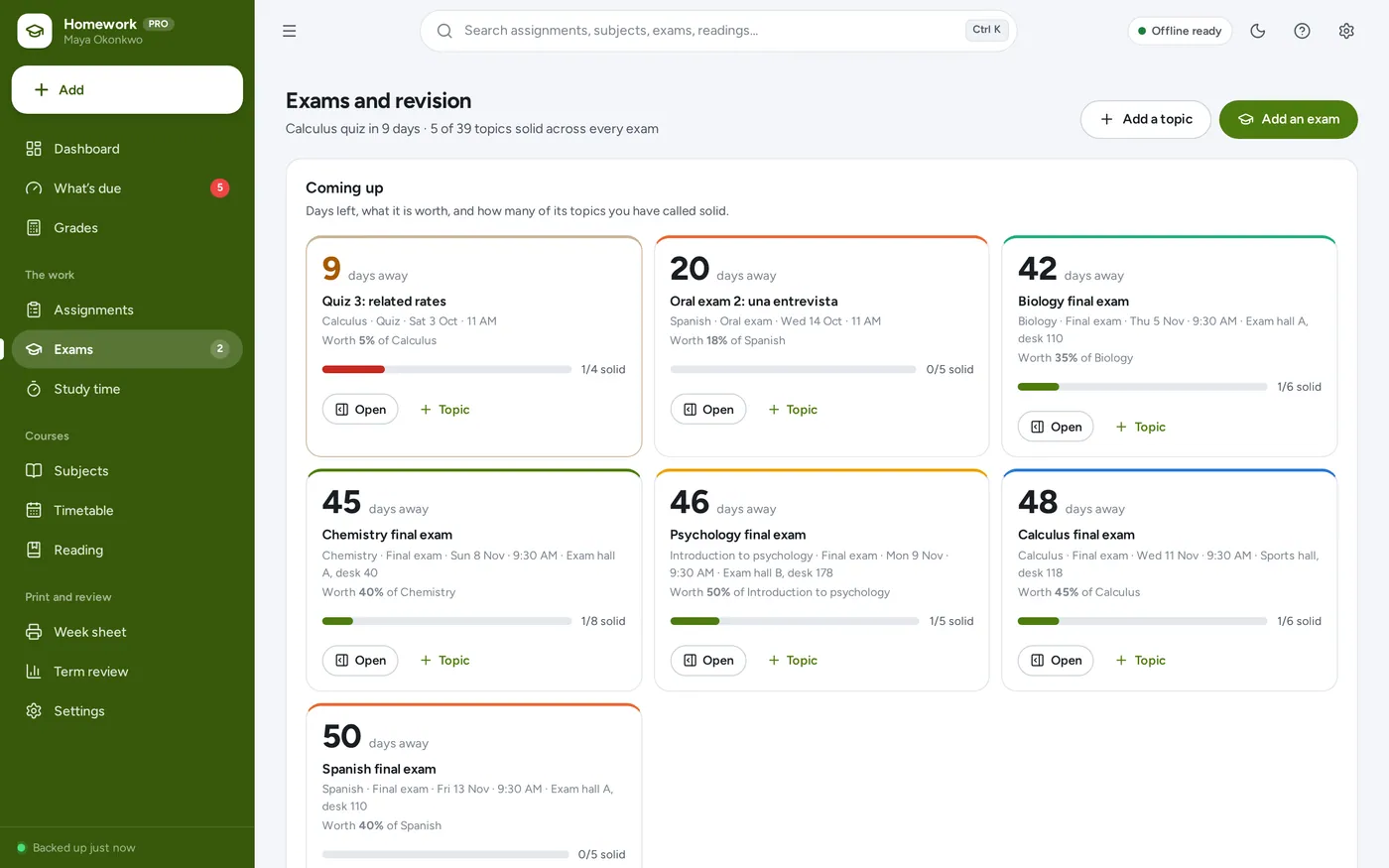
Exams and revision
A countdown, and what you have actually revised
Days left, the room, what it is worth and how many topics are solid
Move a topic on yourself: not revised, shaky, getting there, solid
Past exams keep their marks and count towards the subject grade
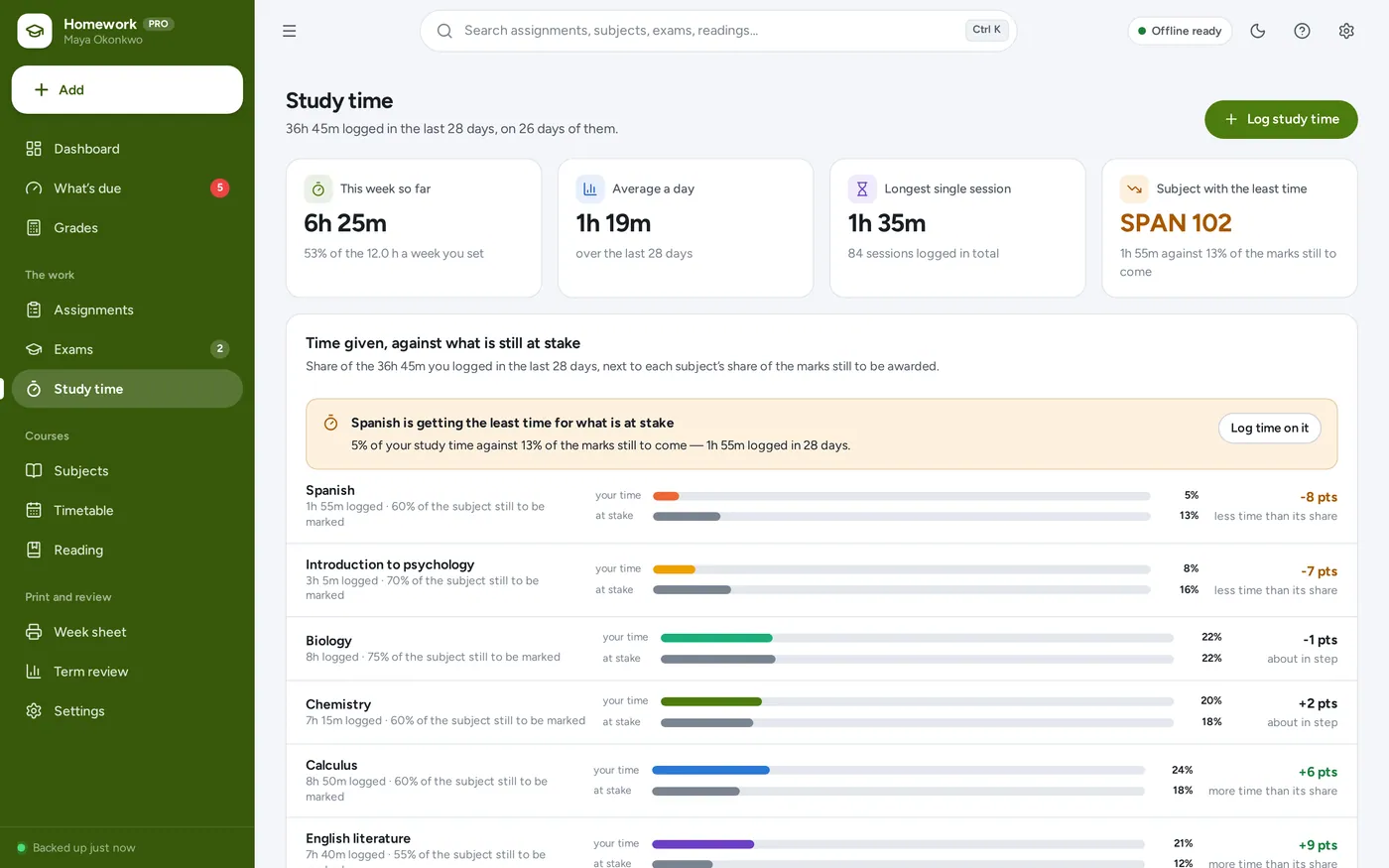
Study time
See the subject you are quietly avoiding
Log minutes per subject as you actually do them
Your share of hours next to that subject’s share of the marks left
The subject getting least time for what is at stake is named
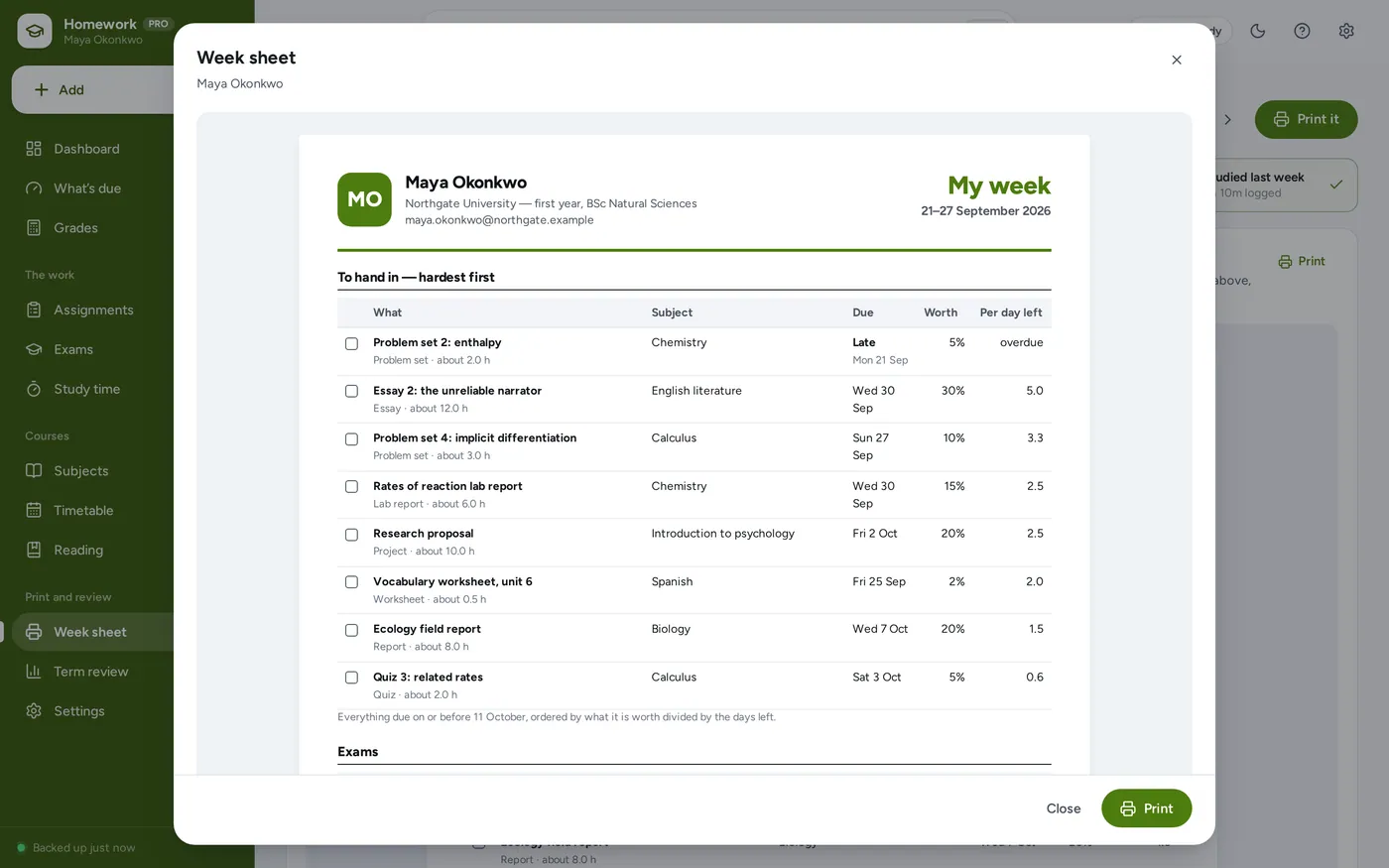
Week sheet
Put the whole week on one page
What is due in priority order, with tick boxes and weights
Exam countdown, topics to revise and the week’s classes
Built for a black-and-white printer, with your own name on it
12 tools in one app
Built for the person doing the work: high school, sixth form, college or university.
DashboardWhat to do next
What’s dueWorth ÷ days left
GradesWhat the final needs
Grade schemeThe one you type in
AssignmentsWeight, dates, brief
ExamsCountdown and topics
Revision planSolid, shaky, not yet
Study timeLogged per subject
TimetableClasses, rooms, teachers
Reading listAnd where each one is
Week sheetOne printable page
Term reviewHow the term went
At the desk, in the library, on the bus
Light and dark mode. Install it like an app. Your coursework stays in the browser on your own device — no account, no subscription, nothing uploaded.
Windows, Mac, iPad, Android
Dark mode
1Download & unzipGet the file instantly right after checkout and unzip it anywhere: desktop, USB drive or cloud folder.
2Open index.htmlDouble-click to open in Chrome, Edge, Safari or Firefox. It works without internet from then on.
3Make it yoursExplore with sample data, then put in your subjects, your assignments and your own grade scheme.
Before you buy
What it needs, and what it does not do.
Homework & Assignment Tracker is an offline app from ColadoSystems that runs in your web browser from a folder on your own device. It costs $24.99 once, with no subscription and no account, and includes 12 tools, sample data to explore and a PDF guide. Your records stay on your device and are never uploaded.
Runs in
A current version of Chrome, Edge, Safari or Firefox, on a computer, tablet or phone.
Internet
Only to download it. After that it works with the Wi-Fi off.
Your records
Saved in the browser on this device. They are not encrypted and do not sync between devices, so anyone who can use the device can open them.
Backups
Save a backup file from the app whenever you like. Restore it to recover or to move to another device.
Users
Made for one person on one device. It is not a shared, multi-user system.
Download
A zip file under 3 MB with the app and its PDF guide.
License
For your own business or household. Not for resale. Read the license
Questions
Something else? Email us and we'll answer before you buy.
Where is my data stored? Is it private?
Everything is saved inside your browser on this device. Nothing is uploaded and there is no account, so no company holds a copy of your coursework. They are not encrypted, though: anyone who can use this device and browser can open them, so keep the device locked. Download a backup regularly (Settings → Data & backup → Back up now) and keep it somewhere as safe as the records themselves.
Does it work without internet?
Yes. Open index.html and it runs fully offline. You can also host the folder on any website and choose “Install app” in Chrome or Edge to get a desktop or phone icon that works offline.
Can I use it on my phone or iPad?
Yes. The layout adapts to phones and tablets with a bottom navigation bar. Each device keeps its own data, so use Back up / Restore to move records between devices.
How do I start fresh after trying the sample data?
Go to Settings → Data & backup → Erase records. Your business profile and settings are kept; all sample records are removed.
How is the running grade worked out?
Each assessment has a weight — its share of the subject grade — and, once it comes back, a mark out of something. The app multiplies each weight by its percentage to get the points it banked, adds those up, and divides by the weight that has actually been marked. Work you have not had back is left out entirely, so the running grade is where you stand now rather than a forecast.
What exactly does “what do I need on the final” mean?
It is the mark that would make the arithmetic come out at your target, given the marks already in and an assumption you choose for any other work still outstanding. It is not a prediction of what you will get, and nothing in this app can change a mark. The whole sum is printed next to the answer so you can check it by hand.
What if my weights do not add up to 100%?
The app says so and carries on. Every figure is worked out as a share of the weights you actually entered, not an assumed 100%, so the numbers stay right while you are still adding assessments — and they stay right if your course simply does not total 100. If the weights add up to more than 100% you get a warning to check them against your handbook.
Why is there no grade scheme built in?
Because schools and universities do not agree on one, and inventing boundaries would make every figure in the app wrong for most people. You type in your own scheme — A, B, C, or 2:1 and 2:2, or 1 to 7, or Merit and Distinction — with the lowest percentage that earns each one, and the app speaks your language from then on.
Why is a 30% essay above a 2% worksheet that is due sooner?
Because the list is ordered by what each piece is worth divided by the days you have left. A 30% essay six days away has to earn five points of your grade a day; a 2% worksheet due tomorrow has to earn two. Work already past its due date always comes first whatever it is worth, and you can switch to plain date order whenever you want.
Does it tell me how much to study?
No. It logs what you tell it and compares each subject’s share of your hours with that subject’s share of the marks still to be awarded. It will point out the subject getting the least time for what is at stake, because that is arithmetic. It has no opinion about how many hours you should be doing, and the weekly target is off unless you set one.
Can my parents or my tutor see this?
Only if they use this device and this browser. There is no account, no sync and no sharing — the records sit in one browser on one machine, and they are not encrypted. If you want to show someone your position, print the week sheet or export to Excel.
What happens to assignments that do not count towards the grade?
Leave the “worth” blank and they are excluded from every grade sum, but they still appear on your assignment list and on the week sheet, marked as not counting. Reading responses and practice sheets that are set but never marked belong here.
Can several people use it at the same time?
No. It is made for one person on one device, and records do not sync between devices. To move to another device, save a backup and restore it there.
Need more than one?
The schools & learning bundle has every system in this category for one price.
Schools & learning bundle
From running a school office to planning a homeschool week.
$119.99for 8 systems, $219.92 if bought one by one