The usual cause of a double booking isn’t a careless receptionist. It’s having more than one place to book. Grooms live in a paper diary, kennels live on a whiteboard, and Tuesday’s phone booking lives in someone’s head. Then on Saturday two doodles arrive for the same 10 o’clock slot with the same groomer, while a family drops off their beagle for a kennel already promised to a regular.
A pet grooming and boarding schedule only works when every booking goes into one place, with real limits on time and space. Here’s how to set that up so it holds on your busiest weekend, with paper, a spreadsheet or software.
One pet grooming and boarding schedule, not three
Phone calls, texts, social messages, walk-ins and a second staff member with their own notebook are each fine on their own. Together, they make clashes close to certain.
Fix it with three rules:
- One schedule. Grooming, boarding and daycare go in the same place, whatever that place is.
- Nothing is booked until it’s written down. “I’ll pencil you in” means pen, now.
- Every booking has an end. A finish time for a groom, a checkout date for a stay. Open-ended bookings are where clashes hide.
Set up grooming in lanes
Give each groomer their own column, or lane, for the day. Then stop guessing how long things take. Time your services for a few weeks and write a duration chart by service and size. Yours might look like this:
- Bath and tidy, small dog: 45 minutes
- Full groom, medium dog: 1.5 hours
- Full groom, large doodle: 2.5 hours
- Cleanup between dogs: 15 minutes
Now a day is easy to check. Say Jess works 8:00 to 4:00 with a 30-minute lunch, so she has 7.5 hours of table time. Two large doodles take 5 hours, one medium full groom takes 1.5, and three cleanups add 45 minutes. That’s 7.25 hours, leaving 15 minutes: room for a nail trim at most, not another bath.
Price by size too (small, medium, large and extra large), so the price and the time block always match. And rebook before the owner leaves. Suggest the next groom in four or six weeks while the dog is still at the counter, with the same groomer if the pet settles better with someone it knows.
How do you keep track of kennel capacity?
Use a grid: kennels down the side, nights across the top. Count nights, not days. A dog arriving Friday afternoon and leaving Monday morning uses three nights (Friday, Saturday and Sunday), and the kennel is free again on Monday night.
A worked example: say you have 10 kennels and a long weekend from Friday to Monday. That’s 3 nights times 10 kennels, or 30 kennel-nights. If 27 are booked, you’re at 90% and you have exactly three nights left to sell, not “a few spaces”.
Habits that prevent trouble:
- Match the kennel to the pet. A giant breed needs a large run, and a cat needs a condo away from the barking.
- On busy weekends, keep one kennel free for an extension or an emergency.
- Set check-in and checkout windows, and write them on every booking.
- If you run daycare, set a daily cap and count against it at check-in, not when the yard starts to feel full.
A pet grooming and boarding app with a kennel board draws this grid for you, but a whiteboard ruled into squares works if everyone uses it every time.
What to keep on every pet profile
The schedule tells you when. The profile tells you who. Before a pet is on the table or in a kennel, staff should be able to see:
- Alerts first: bites, nervous with dryers, seizures, a shampoo allergy. Put these at the top.
- Owner name, phone number and an emergency contact.
- Vet name and phone number.
- Feeding and medication instructions for boarding, in the owner’s words. Follow the owner’s and vet’s instructions exactly, and call them if anything is unclear.
- Grooming notes: blade length, style, what the owner loved or didn’t.
- Visit history and upcoming bookings.
The same thinking applies to any appointment business. This guide to what to keep on every salon client record covers note-taking and rebooking habits that transfer well to pets.
Check vaccine records before check-in, not at the door
Discovering an expired vaccine at 7:30 a.m., with the owner on the way to the airport, is miserable for everyone. Move the check earlier.
- Decide which vaccines and records you require. That depends on local rules, your insurer and your vet’s advice, so ask them and write the policy down.
- Record each vaccine with its expiry date, not just “up to date”.
- A week before every booking, check the pets coming in. Anything expired, or due before the stay ends, gets a friendly reminder.
- Mention the policy when the owner books, so it’s never a surprise. This client onboarding checklist for small service businesses has a good routine for collecting details like these before the first visit.
Paper, spreadsheet, subscription or offline app?
A paper diary and a whiteboard are quick and visible, and the whole team can glance at them. They can’t warn you about clashes or expiring vaccines, and handwriting suffers on a busy day.
A spreadsheet suits the kennel grid well. Clash warnings, vaccine expiry checks and duration math all have to be built and maintained by you, though.
Subscription grooming software often includes online booking for owners, automatic text reminders and syncing across locations. If you want owners to book themselves, that’s worth paying for. Count the cost over time: at, say, $50 a month, it’s $600 a year, every year.
A ready-made offline system is a one-time price and runs at the front desk without internet. Because it runs on your own device, there’s no online booking page for owners, each device keeps its own copy rather than sharing live with a team, and you make the backups.
Keeping it all in one place
Building this yourself means a kennel grid with formatting that turns red on overlaps, a grooming sheet with a column per groomer, a duration and price chart by size, a pets tab with alerts and vaccine dates, and a formula that flags anything expiring before a booking. It can be done. It also tends to break the first time someone inserts a row in the wrong place.
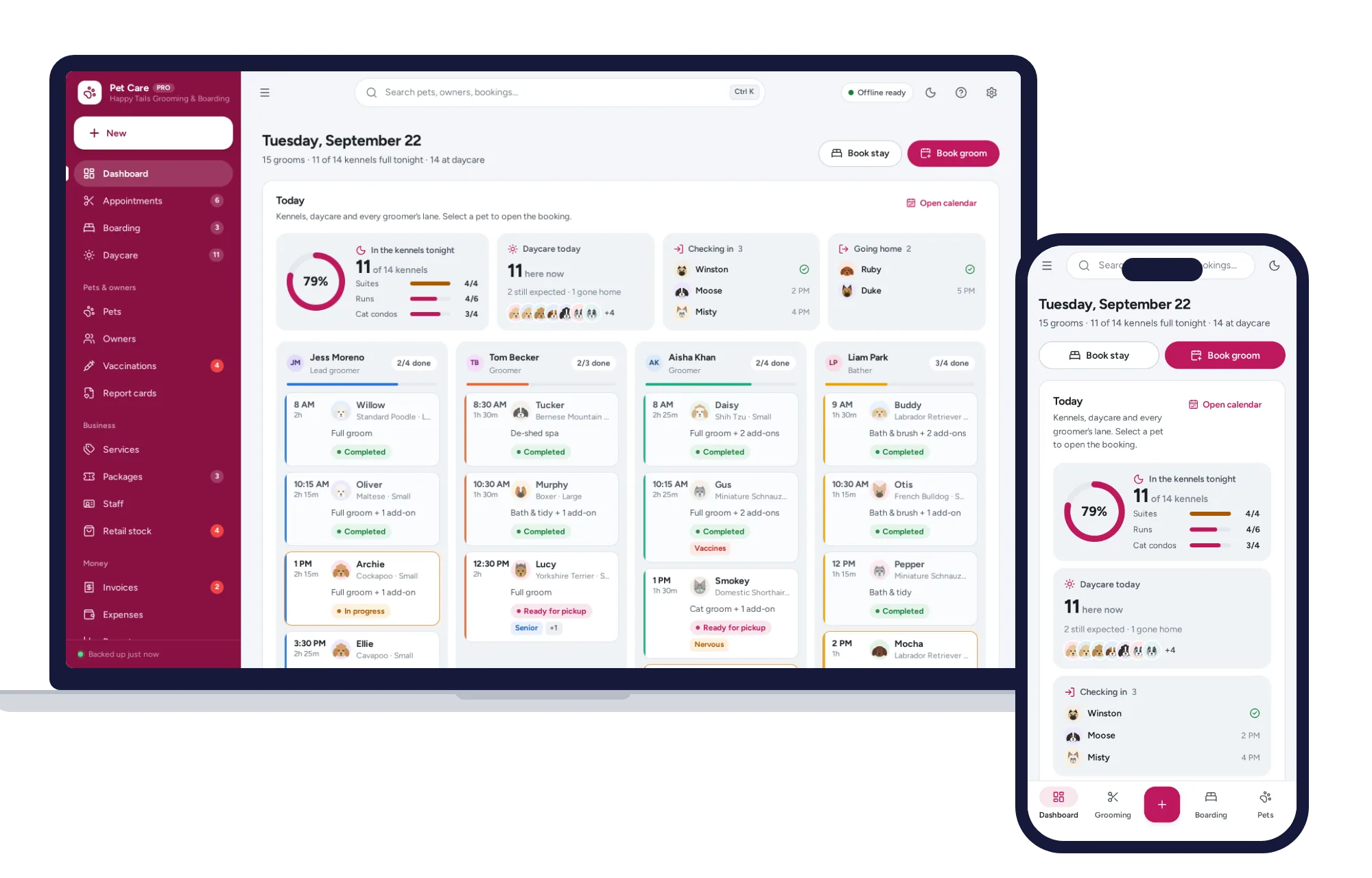
The Pet Grooming & Boarding Manager has those pieces ready. The boarding board puts kennels down the side and 14 nights across the top. Click an empty square to book with the rate filled in, and see nightly occupancy and today’s check-ins. The grooming calendar gives each groomer a lane, picks the price by pet size, suggests the pet’s usual groomer and rebooks in four or six weeks with one click. Pet profiles put behavior and medical alerts up front, with vaccines, vet, feeding and grooming notes, visit history and upcoming bookings. The vaccine radar lists expired, missing and due-soon vaccines with booked pets first, and gives you a ready-made reminder to copy for the owner. Daycare check-in uses pass credits automatically and shows a capacity bar, and you can print a report card after each groom. It handles cats as well as dogs, and kennels can be suites, runs or cat condos.
It opens with sample data so you can try it before entering a single pet, there’s no account or sign-up, it works offline, your records stay on your own device, and a PDF guide is included. There are more systems for salons, studios and events on the same shelf.
You can see everything inside the Pet Grooming & Boarding Manager and try it with the sample data the same day.
Skip the setup
The Pet Grooming & Boarding Manager has the records this guide describes already set up. Grooming calendar, boarding board, daycare check-in, vaccines and report cards — one offline app.
$29.99 one-time
- Sample data to try it the same day
- Works offline, records stay on your device
- A PDF guide in the download
See everything inside the Pet Grooming & Boarding Manager. Or take the whole Salons, studios & events shelf: 6 systems for $99.99, $79 less than one by one.
Common questions
How do you avoid double booking in a grooming salon?
Keep every booking in one schedule, whether it comes by phone, message or walk-in, and give each groomer a separate column. Use a duration chart by service and dog size instead of guessing, add cleanup time between appointments, and make it a rule that nothing counts as booked until it is written into that one schedule.
How do you calculate kennel occupancy?
Multiply your number of kennels by the nights in the period to get available kennel-nights, then divide the nights actually booked by that figure and multiply by 100. With 12 kennels over a 7-night week you have 84 kennel-nights, so 63 booked nights means 75 percent occupancy. Count nights rather than days so arrivals and departures are not counted twice.
What vaccinations does a dog need for boarding?
It depends on local regulations, your insurance and advice from a veterinarian, so there is no single list that applies everywhere. Ask your own vet and insurer which vaccines to require, put the policy in writing and share it when owners book. Record each vaccine with its expiry date and check them several days before the stay, not at drop-off.
How often should a dog be groomed?
It depends on the coat, the cut and the dog's lifestyle. Dogs whose hair keeps growing usually need regular professional grooms, while short coats may need little more than baths, brushing and nail trims. Ask the groomer to recommend an interval for that particular dog and book the next appointment before leaving, so the coat never gets matted between visits.